ePAD: The Essential Guide to Digital Nursing Practice Assessments and Student Progress
Discover how ePAD simplifies clinical placements, supports nursing students, and helps supervisors manage assessments, feedback, and professional development.

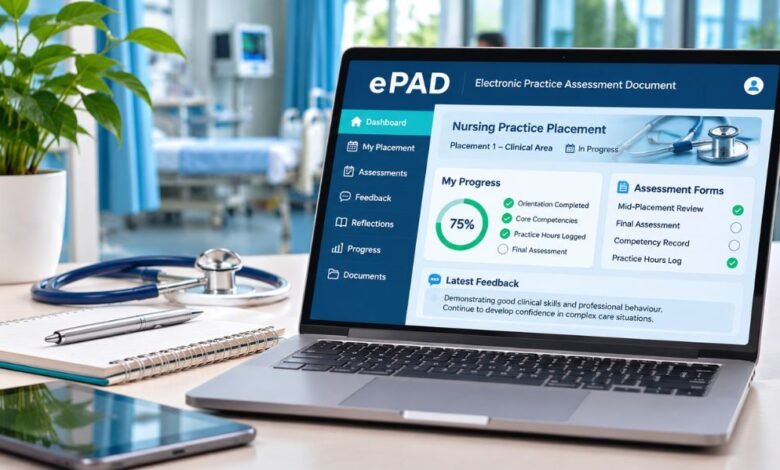
The ePAD, or Electronic Practice Assessment Document, has become an important part of clinical education, particularly for nursing students completing practical placements. Instead of relying entirely on paper records, students and healthcare educators can use a digital system to document learning experiences, monitor progress, and complete essential assessments.
For nursing students, understanding how ePAD works can make placement documentation considerably easier. It provides a structured way to record clinical competencies, receive feedback, and demonstrate professional development.
This article explains the purpose of ePAD, its main features, login procedures, assessment responsibilities, and practical benefits for students and healthcare professionals.
What Is ePAD and Why Is It Used?
ePAD stands for Electronic Practice Assessment Document. Educational institutions and healthcare training programs use it as a digital record to assess students during practical placements.
The system allows students, practice supervisors, practice assessors, and academic staff to contribute to a shared assessment record.
In nursing education, practical experience is essential for developing clinical judgment, communication skills, and professional competence.
An electronic assessment document helps organize evidence of these achievements while reducing dependence on physical paperwork.
Different universities use different digital platforms to provide ePAD functionality. Examples include MyProgress and PebblePad, although institutional systems and procedures vary.
How the ePAD System Works
The ePAD process connects clinical learning with academic assessment through a structured digital record.
Students typically receive access through their university or training institution.
Once they access the platform, they can review placement requirements and complete required documentation.
Recording Clinical Placement Activities
Students may use the system to document:
- Placement orientation and initial meetings.
- Clinical learning experiences and reflections.
- Practice hours and attendance records.
- Skills and professional competencies.
- Feedback from supervisors.
- Intermediate and final placement assessments.
The available forms and assessment requirements depend on the university and healthcare program.
Reviewing Student Performance
Practice supervisors can provide feedback about a student’s clinical activities and professional conduct.
Practice assessors evaluate relevant evidence and determine whether required proficiencies have been achieved.
Academic assessors contribute to the assessment process according to the program’s procedures.
This coordinated approach supports clearer communication between universities and placement providers.
Essential Features of an ePAD Platform
Although different institutions use different software, electronic practice assessment systems often share several useful features.
Centralized Learning Records
The platform keeps relevant placement documentation in one place, making it easier to find previous assessments, feedback, and completed forms.
Students can follow their progress without maintaining separate paper portfolios.
Digital Feedback and Sign-Off
Authorized supervisors and assessors can review student documentation and complete digital approvals.
This creates a more organized assessment process and helps students identify outstanding requirements.
Progress Monitoring
Digital records let students and educators track achievement against program expectations.
Some platforms provide dashboards or progress summaries that highlight completed and pending assessments.
Mobile Accessibility
Certain ePAD systems support smartphones and tablets alongside desktop computers.
Some platforms also offer offline functionality through dedicated applications, allowing information to be recorded when internet access is limited.
However, not every system offers offline access.
How to Access Your ePAD Account
The correct login procedure depends on the university and the platform it uses.
Step 1: Find Your University’s ePAD Portal
Visit your university’s official website or student learning portal.
Look for the nursing placement, practice learning, or electronic assessment section.
Step 2: Use Your Authorized Credentials
Many universities let students sign in with their institutional accounts.
Some systems use a separate username and password.
Step 3: Open Your Placement Record
After you sign in, go to the relevant placement, assessment document, or student portfolio.
Step 4: Review Required Documentation
Check which forms, clinical competencies, reflections, and assessment activities you need to complete.
Step 5: Save and Submit Your Work
Follow the platform’s instructions for saving, submitting, or requesting assessment approval.
Always verify that a form has been successfully submitted rather than assuming that saving automatically completes the process.
Benefits of ePAD for Nursing Students
One significant advantage of ePAD is improved organization.
Students can maintain a structured record of their clinical development instead of managing multiple paper documents.
Digital assessment also makes it easier to revisit previous feedback and identify areas requiring further improvement.
Another benefit is communication.
When authorized educators can access the same assessment information, they can better understand a student’s progress and provide relevant support.
The system can also encourage reflective learning.
By documenting practical experiences, students can consider how their clinical skills, professional behavior, and decision-making develop throughout their training.
How Practice Supervisors and Assessors Use ePAD
Clinical assessment involves different responsibilities, and the distinction between supervision and assessment is particularly important.
Practice Supervisors
Practice supervisors support students during clinical activities and provide feedback about their learning and performance.
They may contribute observations, comments, and relevant documentation within the digital system.
Practice Assessors
Practice assessors evaluate evidence of student achievement and make assessment decisions in line with the program’s requirements.
They may review feedback, documented competencies, and student reflections before completing assessment records.
Academic Assessors
Academic assessors help coordinate assessment decisions from an educational perspective.
Their responsibilities are defined by the relevant professional standards and university procedures.
Together, these roles help create a structured assessment process that connects practical learning with academic expectations.
Common ePAD Problems and Practical Solutions
Like other digital learning platforms, ePAD systems can occasionally present technical or administrative difficulties.
Unable to Log In
Check that you are using the correct institutional portal.
Confirm your username and password, and follow your university’s official account recovery procedure if necessary.
Missing Assessment Forms
Make sure you have opened the correct placement record or program section.
If required documents remain unavailable, contact the relevant practice education team.
Supervisor Cannot Access the Record.
Some platforms require students to allocate supervisors or assessors before those staff members can access it.
Check whether the allocation process has been completed correctly.
Changes Are Not Appearing
Verify that you have saved or submitted the information.
If you use an offline application, check whether synchronization completed successfully.
Avoid creating duplicate records without your institution’s guidance.
Data Protection and Professional Responsibility
Digital clinical assessment records may contain personal information about students and their professional development.
Access should therefore be restricted to authorized individuals.
Students should use approved university systems, protect their login credentials, and follow institutional information security policies.
Patient confidentiality is equally important.
Clinical reflections should not include identifiable patient information unless recording that information is explicitly authorized and appropriately protected.
Maintaining accurate and professional documentation is an essential part of healthcare education.
Frequently Asked Questions About ePAD
1. What does ePAD stand for in nursing?
ePAD stands for Electronic Practice Assessment Document. It is used to document and assess students’ clinical learning, practical competencies, professional development, and placement performance.
2. Can nursing students access ePAD from home?
Many institutions provide browser-based access that allows students to review their records outside placement settings. Access depends on university policies, account permissions, and internet availability.
3. How do practice assessors access ePAD?
Access arrangements vary. Some platforms create assessor accounts after a student submits an allocation form, while others use institutional registration procedures. Assessors should follow their university’s official guidance.
4. What happens if a student forgets their ePAD password?
Students should use the approved password recovery option or contact their university’s IT support service. Where institutional single sign-on is used, the university account recovery process may apply.
5. Is ePAD the same as an electronic signature pad?
No. In healthcare education, ePAD generally means Electronic Practice Assessment Document. The similar term ePad also refers to electronic signature capture devices, including products associated with ePadLink. These are different technologies serving different purposes.
Conclusion: Why ePAD Matters in Modern Nursing Education
The ePAD provides a practical digital approach to recording and evaluating clinical learning. By bringing placement documentation, professional feedback, competency assessments, and progress records into one system, it supports more organized communication between nursing students and educators.
Its effectiveness depends on accurate documentation, active participation, and consistent assessment practices.
For students, understanding their institution’s ePAD procedures is an important step towards managing clinical placements confidently and demonstrating progress throughout their professional education.